L'aide française est disponible au format PDF en cliquant ici (ou dans le Menu "Démarrer", Finale 2011, Documentation PDF française)

Le tutoriel français est disponible au format PDF en cliquant ici.

La mise à jour de l'aide française au format HTML sera disponible prochainement.

Traduction française :

Vous êtes ici : Reference > Dialog Boxes > S > Set Placeholder dialog box

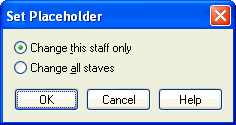
Set Placeholder dialog box

How to get there

From the Window menu, choose Advanced Tools. Click the Mirror Tool  image\Mirror_Tool.gif, and click any measure that contains notes. The Placeholder dialog box appears, letting you specify how many "blank" beats you want (for use in creating a pickup measure). Make a selection and click OK.

What it does

If your piece has more than one staff, Finale is asking whether the pickup measure only occurs in the staff you clicked, or in all staves.

See Also:

Mirror Tool


Page d'accueil du manuel