L'aide française est disponible au format PDF en cliquant ici (ou dans le Menu "Démarrer", Finale 2011, Documentation PDF française)

Le tutoriel français est disponible au format PDF en cliquant ici.

La mise à jour de l'aide française au format HTML sera disponible prochainement.

Traduction française :

Vous êtes ici : Reference > Dialog Boxes > M > MIDI Event dialog box

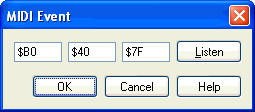
MIDI Event dialog box

How to get there

Click the HyperScribe Tool  image\HyperScribe_Tool.gif. From the Beat Source submenu of the HyperScribe menu, choose Tap or Playback and/or Click. In the dialog box that appears, click Other (or choose Other from the Start Signal for Recording drop-down list).

What it does

When you’re preparing for a HyperScribe recording, Finale needs to know what MIDI signal will serve as the tempo reference (or the metronome "trigger"). This dialog box lets you choose a MIDI signal not already listed in the dialog box.

See Also:

Recording with HyperScribe

Playback and/or Click

Tap Source

HyperScribe Tool


Page d'accueil du manuel