|
L'aide française est disponible au format PDF en cliquant ici (ou dans le Menu "Démarrer", Finale 2011, Documentation PDF française)
Le tutoriel français est disponible au format PDF en cliquant ici.
La mise à jour de l'aide française au format HTML sera disponible prochainement.
|
Traduction française :

|
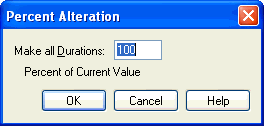
Percent Alteration Note Durations dialog box
How to get there
From the
Window menu, choose Advanced Tools. Click the MIDI Tool  . Select a region of measures. (If you’re editing only
a single staff, double-click the highlighted area to enter the MIDI Tool
split-window.) Specify the MIDI
data type you want to edit by choosing Note Durations from the MIDI Tool
menu. If you’re in the MIDI Tool split-window,
select the region you want to affect by dragging through the "graph"
display area or by selecting the handles of individual notes whose MIDI
data you want to edit. Choose Percent Alter from the MIDI Tool menu.
. Select a region of measures. (If you’re editing only
a single staff, double-click the highlighted area to enter the MIDI Tool
split-window.) Specify the MIDI
data type you want to edit by choosing Note Durations from the MIDI Tool
menu. If you’re in the MIDI Tool split-window,
select the region you want to affect by dragging through the "graph"
display area or by selecting the handles of individual notes whose MIDI
data you want to edit. Choose Percent Alter from the MIDI Tool menu.
What it does
This dialog box’s function is to change
the duration of every note in the selected region by a percentage of its
current value. Because it changes the data of every selected note by a
percentage, the Percent Alter command preserves the relative proportions
of the existing values.
- ___
percent of current value. In this text box, enter the percentage
by which you want the note durations changed for the selected notes. This
value can be any number above zero—you can enter 300%, for example, to
make a particular value three times its current value. The number in this
text box represents the amount by which you want to shorten or lengthen
the playback durations of all selected notes (regardless of their notated
durations). Note that this is the only MIDI Tool command that directly
modifies the durations of existing notes (the other commands modify the
notes’ durations indirectly, by manipulating their Start and Stop Times).
For example, if you want a region of eighth notes and quarter notes to
play back staccato, enter 50 (%) in this box; the notes will be sustained
for only half their original durations.
- OK
• Cancel. Click OK to confirm, or Cancel to discard, the MIDI data
changes you’ve specified. You return to the MIDI Tool split-window
(or the score).
See Also:
MIDI
Tool menu
MIDI Tool
