L'aide française est disponible au format PDF en cliquant ici (ou dans le Menu "Démarrer", Finale 2011, Documentation PDF française)

Le tutoriel français est disponible au format PDF en cliquant ici.

La mise à jour de l'aide française au format HTML sera disponible prochainement.

Traduction française :

Vous êtes ici : Reference > Menus > Staff Menu

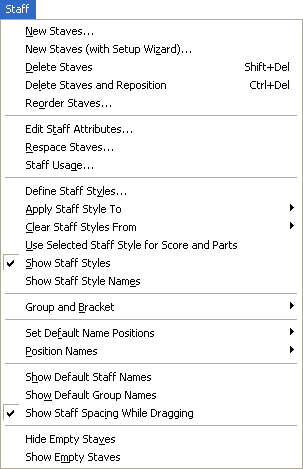
Staff menu

How to get there

Click the Staff Tool  image\Staff_Tool.gif.

What it does

Use the Staff menu to add or insert blank staves, remove existing staves, position staff names, change the settings for a selected staff, adjust staves vertically, redraw barlines and brackets after changing the top-to-bottom order of staves, and set the spacing between staves. You can also create groups and define their characteristics, delete groups, choose a bracket and alternate barlines for a group, and change which staves belong to a group.


New Staves

New Staves (With Setup Wizard)

Delete Staves

Delete Staves And Reposition

Reorder Staves

Edit Staff Attributes

Respace Staves

Staff Usage

Define Staff Styles

Apply Staff Styles To

Score and Parts

Current Part/Score

Clear Staff Style From

Score and Parts

Score Only

Parts Only

Use Selected Staff Style for Score and Parts

Show Staff Styles

Show Staff Style Names

Groups and Brackets

Add

Edit

Remove

Set Default Name Positions

Position Names

Show Default Staff Names

Show Default Group Names

Show Staff Spacing while Dragging

Hide Empty Staves

Show Empty Staves


Page d'accueil du manuel