|
L'aide française est disponible au format PDF en cliquant ici (ou dans le Menu "Démarrer", Finale 2011, Documentation PDF française)
Le tutoriel français est disponible au format PDF en cliquant ici.
La mise à jour de l'aide française au format HTML sera disponible prochainement.
|
Traduction française :

|
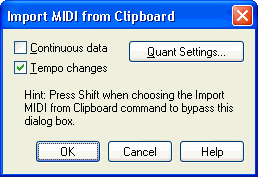
Import MIDI from Clipboard dialog box
How to get there
Place some MIDI data on the clipboard (from
Finale or another sequencing program). Click the Selection Tool  or any other tool with regional selection. Select a region
of music. Choose Import MIDI from Clipboard from the Edit menu.
or any other tool with regional selection. Select a region
of music. Choose Import MIDI from Clipboard from the Edit menu.
What it does
Use the Import MIDI from Clipboard dialog
box to change
settings and other options when you’re importing a MIDI file from the
clipboard. The options are the same as those in the Import MIDI File dialog
box, except Convert Markers is not available. For an explanation of these
settings, see Import MIDI file Options dialog box
and Quantization Settings dialog box.
To use the current settings in the Import
MIDI from Clipboard dialog box (without displaying the dialog box on the
screen), press shift when you choose Import MIDI from Clipboard from the
Edit menu.
See Also:
Quantization
Settings
Selection Tool
