|
L'aide française est disponible au format PDF en cliquant ici (ou dans le Menu "Démarrer", Finale 2011, Documentation PDF française)
Le tutoriel français est disponible au format PDF en cliquant ici.
La mise à jour de l'aide française au format HTML sera disponible prochainement.
|
Traduction française :

|
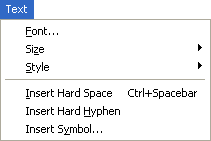
Text menu (Lyrics Tool)
How to get there
Choose the Lyrics Tool
 .
.
This Text menu appears when the Lyrics Tool
is selected for editing lyrics either directly in the score or within the Lyrics window. See Lyrics.
What it does
The Lyrics Tool Text menu contains options for editing
lyric fonts, sizes, styles, and so on, displaying the text
as it will appear on the screen and on your printed music.
You can also use this menu to add a 'hard space' or 'hard hyphen' instead of using the keyboard shortcuts (Alt+0160 for a hard space and Alt+0173 for a hard hyphen).
